
CryptoPayIn for MagentoFree and open source
Accept crypto payments on Magento 2. Connected in one click.
The free CryptoPayIn module adds Bitcoin, USDT, Ethereum, Monero and 9 more coins to your Magento checkout. Install it, click Connect with CryptoPayIn and get paid on-chain: no API key to copy, no KYC, a flat 1% fee.


- Version
- 1.0.0
- Requirements
- Magento 2.4.6 – 2.4.8 · PHP 8.1 – 8.4
- License
- GPL-2.0-or-later Free and open source
- Languages
- 10 EN · FR · ES · DE · IT · PT · RU · TR · ZH · JA
Three steps, about two minutes
- 1
Install
Upload the zip from your store’s back office, like any other plugin. Nothing to configure on your server.
cryptopayin-for-magento-1.0.0.zip - 2
Connect
Click Connect with CryptoPayIn and approve. A key limited to payments is created for this store: nothing to copy, nothing to paste.
Connect with CryptoPayIn - 3
Get paid
Shoppers pick a coin, scan a QR code and pay. The order is marked as paid the moment the blockchain confirms.
Order #1042 · Paid
No account yet? You create it on the connection screen: about 30 seconds, no email, no ID.
A payment page that belongs to your store
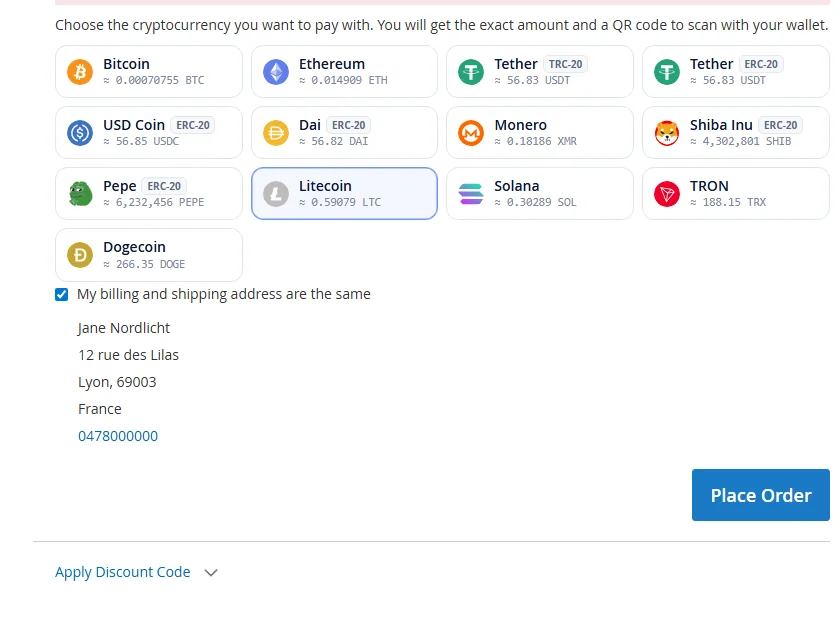
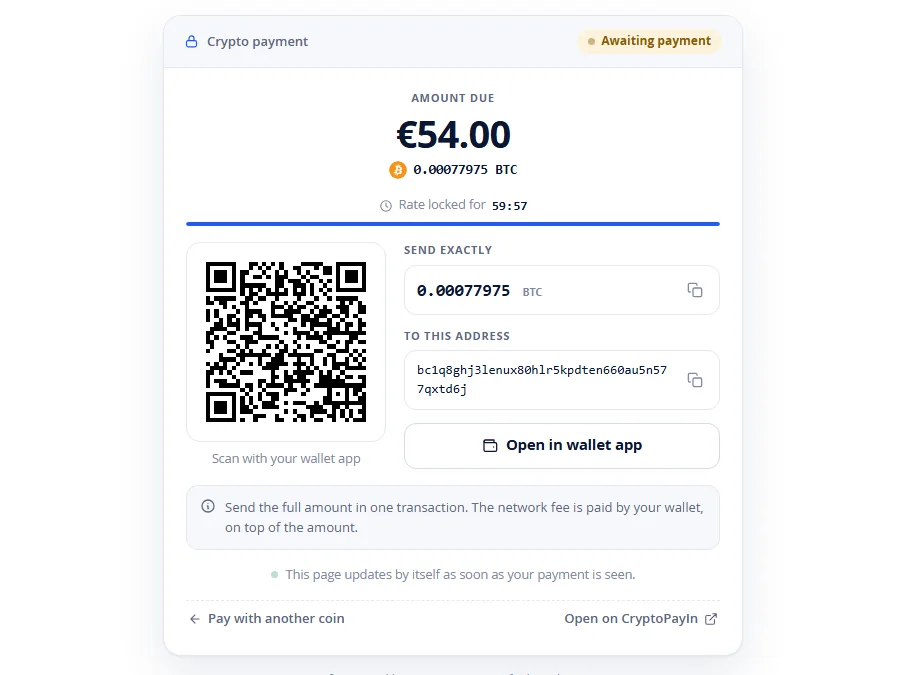
Shoppers choose crypto at checkout and pay on a page of your own site, in your theme and in their language. No redirect to a third party, no account to create.
- Scan or copy
A QR code, the exact amount and the address, each with its copy button. On a phone, one tap opens the wallet app.
- A locked rate
The price is converted from your store currency at a live rate, then locked while the countdown runs.
- Live confirmations
The page follows the blockchain by itself, then takes the shopper to the order confirmation.
- Every device
Designed for phones first. It even works with JavaScript turned off.
 Crypto payment
One click to connect. Then it runs itself.
No API key to create, copy or paste. You approve once on CryptoPayIn and the plugin sets everything up, then keeps watching it for you.
- A health checklist
Key, webhooks, store currency, coins and checkout: one line each, green when all is well, with the fix when it is not.
- Orders that update themselves
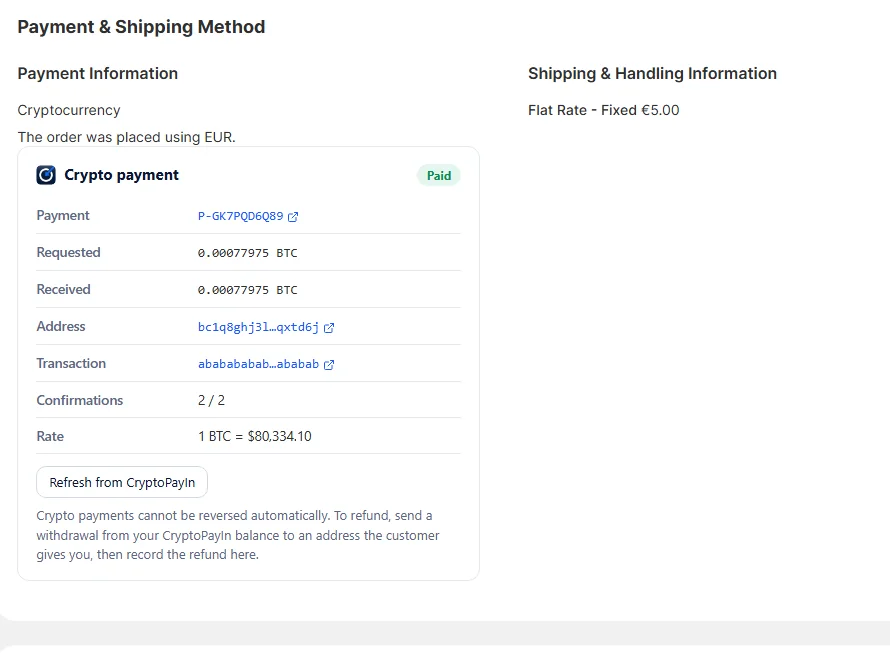
Paid, partially paid, expired or late: every order moves to the right status on its own, even if the shopper closed the tab.
- The payment on every order
Amounts, address, transaction and confirmations are on the order screen, with a refresh button.
- A key that cannot withdraw
The store only holds a key that creates and reads payments. Moving funds stays in your CryptoPayIn dashboard.
Built for Magento
One module for Magento Open Source and Adobe Commerce 2.4.6 to 2.4.8, and for Mage-OS, with PHP 8.1 to 8.4.
When the blockchain confirms, Magento captures the payment its own way: invoice, transaction, and the order in Processing.
Unpack it into app/code or install it as a Composer package. A cron job double-checks open payments every five minutes.
A partial payment, a late one, an expired price, a shopper who changes coin: each has a clear outcome for you and a clear message for the customer.
Bitcoin, Ethereum, USDT, USDC, Monero, Solana and more, priced from your store currency at a live, locked rate.
Checkout, payment page and emails follow the shopper’s language. The settings follow yours.
CryptoPayIn in Magento
How to install it on Magento
- Download the module above and unpack it into
app/code/CryptoPayIn/Payment, at the root of your Magento installation. - From that root, run these commands:
bin/magento module:enable CryptoPayIn_Payment bin/magento setup:upgrade bin/magento setup:di:compile bin/magento setup:static-content:deploy -f bin/magento cache:flush - In the admin, open Stores → Settings → CryptoPayIn.
- Click Connect with CryptoPayIn and approve. Crypto is now offered at your checkout.
- Requirements
- Magento 2.4.6 – 2.4.8 · PHP 8.1 – 8.4
- Updating
- The settings screen tells you when a new version is out. Replace the files, then run the commands of step 2 again: settings and payments are kept.
Frequently asked questions
How do I accept Bitcoin on Magento 2?
Unpack the CryptoPayIn module into app/code/CryptoPayIn/Payment, run the setup commands, open Stores → Settings → CryptoPayIn and click Connect with CryptoPayIn. Bitcoin, USDT, Ethereum, Monero and the other coins are then offered at your checkout, and each order is marked as paid when the blockchain confirms.
Which Magento versions are supported?
Magento Open Source and Adobe Commerce 2.4.6 to 2.4.8, and Mage-OS, with PHP 8.1 to 8.4.
Can I install the module with Composer?
Yes. The zip is a valid Composer package, cryptopayin/module-payment, that you can use as an artifact repository. Unpacking it into app/code works too.
Does the module need cron?
Magento’s cron should run, as on any store: the module adds a job that double-checks open payments every five minutes. Without it, orders are still updated by signed webhooks and whenever the shopper is on the payment page.
Do I need an API key?
No. Connect with CryptoPayIn creates one for your store in one click. Pasting a key by hand remains possible if you prefer.
Do I need a CryptoPayIn account first?
No. If you do not have one, you create it on the connection screen: about 30 seconds, no email and no documents.
How do I check a download?
Each file’s SHA-256 is shown under its button. Compute the checksum of the file you downloaded and compare the two: sha256sum file.zip on Linux, shasum -a 256 file.zip on macOS, certutil -hashfile file.zip SHA256 on Windows.
Built the careful way
The key a plugin holds creates and reads payments. Moving funds needs your dashboard, and your two-factor code if you set one.
An order is only marked as paid after CryptoPayIn confirms the payment itself. A forged or replayed notification changes nothing.
Every file is published with its SHA-256. Compare it before you install.
Released under the GPL: read every line, audit it, adapt it.
Selling on another platform?
The same engine powers every plugin: one account works with all of them.
WooCommerce, WordPress, PrestaShop, OpenCart, Magento and Adobe Commerce are trademarks of their respective owners, shown here only to say which platform each plugin is for. CryptoPayIn is not affiliated with them.

Your store can take crypto today.
Your account is one click away — no KYC, no waiting. One flat 1% fee per transaction. No subscriptions, no setup costs.